 教學範例《6》…計算等差級數和

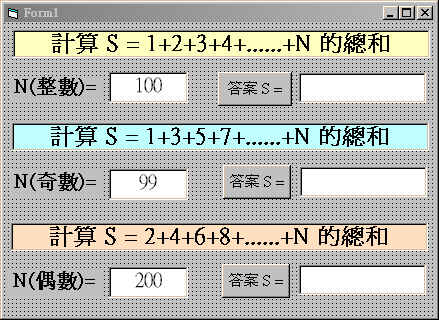
 表單設計與程式執行:
| 表單設計 |
|---|
 |
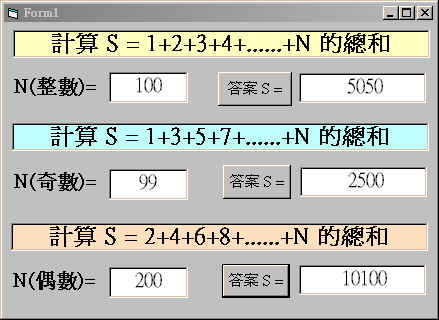
| 執行畫面 |
|
控制項屬性資料:
Label1 : Caption = "計算 S = 1+2+3+4+......+N 的總和" Label2 : Caption = "N(整數)=" Label3 : Caption = "N(奇數)=" Label4 : Caption = "計算 S = 1+3+5+7+......+N 的總和" Label5 : Caption = "N(偶數)=" Label6 : Caption = "計算 S = 2+4+6+8+......+N 的總和" Text1 : Text = "100" Text2 : Text = "" Text3 : Text = "99" Text4 : Text = "" Text5 : Text = "200" Text6 : Text = "" Command1 : Caption ="答案 S =" Command1 : Caption ="答案 S =" Command1 : Caption ="答案 S =" |
程式碼列表:
Private Sub Command1_Click()
N = Val(Text1.Text)
S = 0
For I = 1 To N
    S = S + I
Next I
Text2.Text = Str(S)
End Sub

Private Sub Command2_Click()
N = Val(Text3.Text)
S = 0
For I = 1 To N Step 2
    S = S + I
Next I
Text4.Text = Str(S)
End Sub

Private Sub Command3_Click()
N = Val(Text5.Text)
S = 0
For I = 2 To N Step 2
    S = S + I
Next I
Text6.Text = Str(S)
End Sub

Private Sub Text1_Change()
Text2.Text = ""
End Sub
Private Sub Text3_Change()
Text4.Text = ""
End Sub
Private Sub Text5_Change()
Text6.Text = ""
End Sub
|
程式解說:
|
 學習重點:
˙學會For..Next迴圈與Step指令的程式應用,。
˙學會各種級數和的程式設計。
學習重點:
˙學會For..Next迴圈與Step指令的程式應用,。
˙學會各種級數和的程式設計。