 教學範例《4》…三角形的判斷與計算

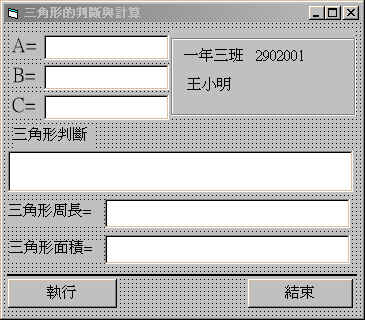
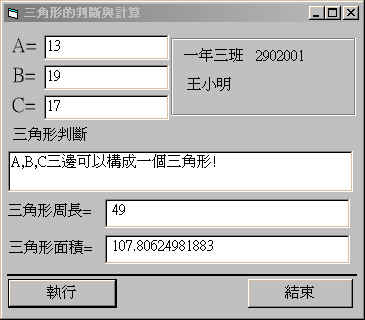
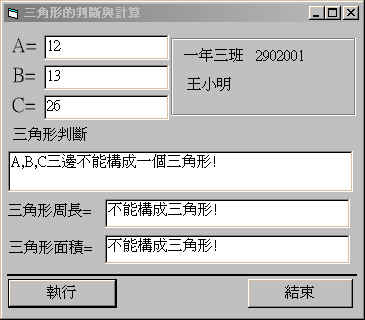
 表單設計與程式執行:
| 表單設計 |
|---|
 |
| 執行畫面 |
|
控制項屬性資料:
Form1 : 調整表單視窗的大小,使Width和Height合乎適當大小。 Label1 : Caption = "A=" Label2 : Caption = "B=" Label3 : Caption = "C=" Label4 : Caption = "一年三班 2902001" Label5 : Caption = "王小明" Label6 : Caption = "三角形判斷" Label7 : Caption = "三角形周長=" Label8 : Caption = "三角形面積=" Frame1 : Caption = "" Text1 : Text= "" Text2 : Text= "" Text3 : Text= "" Text4 : Text= "" Text5 : Text= "" Text6 : Text= "" Line1 : 畫一段適當長短的橫線。 Command1: Caption = "執行" Command2: caption = "結束" |
程式碼列表:
Private Sub Command1_Click()
Dim A, B, C As Single
Dim T as Boolean

A = Val(Text1.Text)
B = Val(Text2.Text)
C = Val(Text3.Text)

L = A + B + C
S = L / 2
D = S * (S - A) * (S - B) * (S - C)

If D < = 0 Then
  Text4.Text = "A,B,C三邊不能構成一個三角形!"
  T = False
  Else
  Text4.Text = "A,B,C三邊可以構成一個三角形!"
  T = True
End If

If T = True Then
   F = Sqr(D)
   Text5.Text = Str(L)
   Text6.Text = Str(F)
   Else
   If T = False Then
         Text5.Text = "不能構成三角形!"
         Text6.Text = "不能構成三角形!"
   End If
End If
End Sub

Private Sub Command2_Click()
End
End Sub
|
程式解說:
|
 學習重點:
˙學會數學計算式的程式寫法--三角形面積計算。
˙學會If..Then..Else判斷式結構的用法。
˙學會使用Boolean(布林)真假值來做程式的判斷依據。
˙能夠正確的運用及修改文字框裡的資料。
學習重點:
˙學會數學計算式的程式寫法--三角形面積計算。
˙學會If..Then..Else判斷式結構的用法。
˙學會使用Boolean(布林)真假值來做程式的判斷依據。
˙能夠正確的運用及修改文字框裡的資料。